top of page

Jonah
Game Design
Chapter 1: Basic Game Flow
It is important to have some sort of framework in mind when trying to develop a game. As a game designer, there is more to it than just the game's mechanics. A proper flow in the game is required.
This write up introduces to a basic game flow or structure of a game that may be considered. Throughout this write up, we will also explore how we can use a common tool, such as Microsoft Excel to create a simple prototype using some basic knowledge in Visual Basic scripting.
----------------------------------------------------------------------------------------------------------------------------
A lot of times, we can get very excited, and quickly dive into the game engine and prototype something out. Games are more than just that.
Since games are a form of interactive entertainment, it is important that the game you are trying to develop has some sort of structure. A lot of times, we forget about this. Without a good structure, users or players of your game will have a hard time navigating your game. A clear game flow might be needed as a way of guiding the player's interaction with you game.
Consider this basic structure below:
1) The player starts off from the Main Menu
2) The player has 2 options
-
Go into the Game (3a)
-
Go to the Options Menu (3b)
3a) If the player goes into the Game, the player is give another 2 options
-
Go back to the Main Menu (2)
-
Go to the Options Menu (4)
3b) If the player goes into the Options Menu, the player is given 1 option
-
Go back to the Main Menu (2)
4) If the player goes into the Options Menu
the player is give 1 option
-
Go back to the Game (3a)
You can refer to this structure in the diagram below for a better understanding following the colour coded arrows.
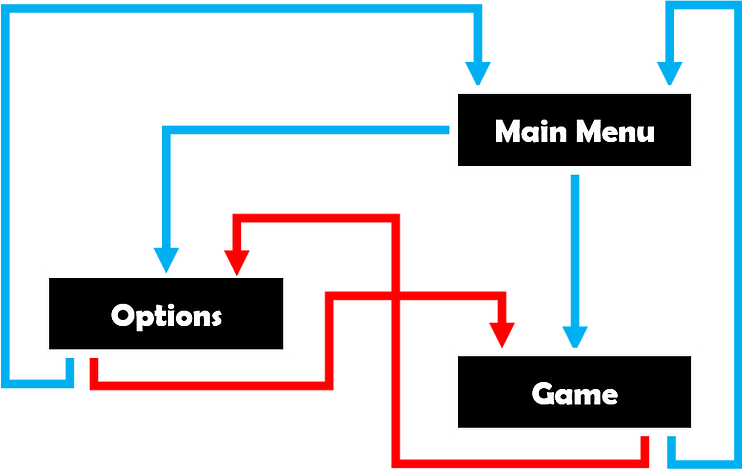
Now that we have a basic flow for our game, we can proceed to prototype this structure out so that we put our idea into practice . This is the main part I feel that often designers lack or leave. I believe that with simple applications, we can quickly prototype this out and present this to perhaps a programmer who can help fine-tune this prototype.
In the next chapter, we will begin applying this using the Visual Basic Editor that can be found with Microsoft Excel.
bottom of page